A long-term memory for coding agents, built on one architecture graph.
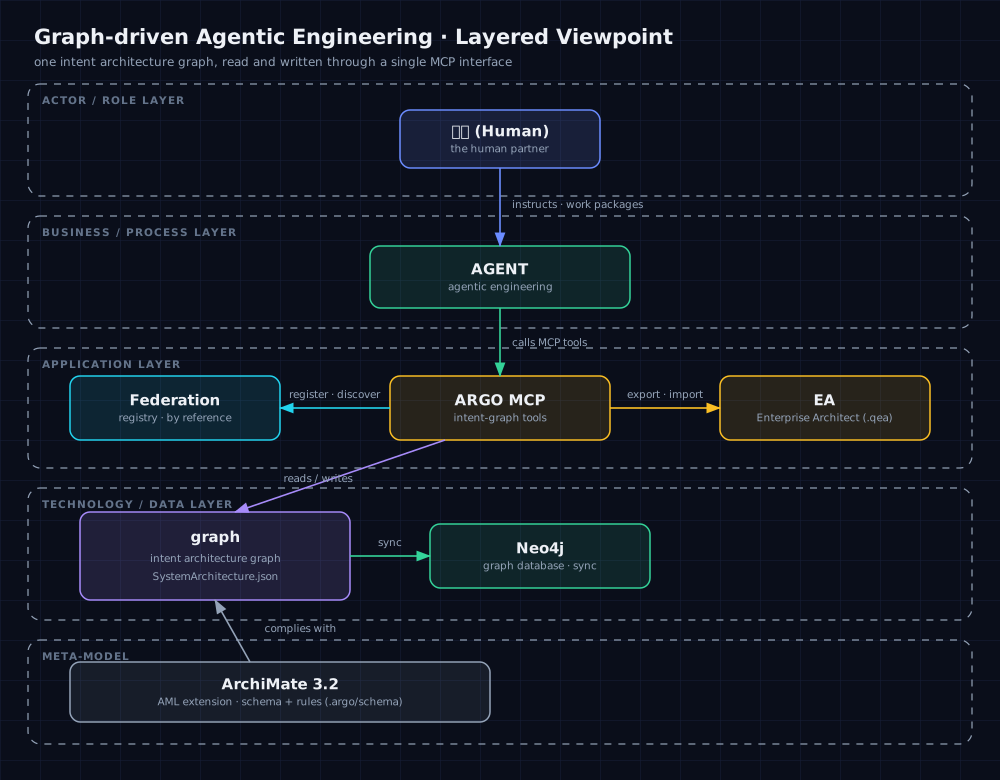
ArchGraph turns an ArchiMate 3.2 intent graph into the durable memory of your agent — read and written through a single MCP interface, so agents restore context without reloading everything.
Writes are deduplicated, so the graph stays clean and semantic recall stays precise.
# inside your project, ask the agent to run:
$ argo init   # initializeWorkspace MCP call
Agent memory = Graph + MCP
Keep the graph clean, so recall stays precise.
The model reasons; the harness acts. ArchGraph gives the agent a memory that both can trust — a graph it reads semantically and writes without ever duplicating.
What is this?
A unified language for harness and product design.
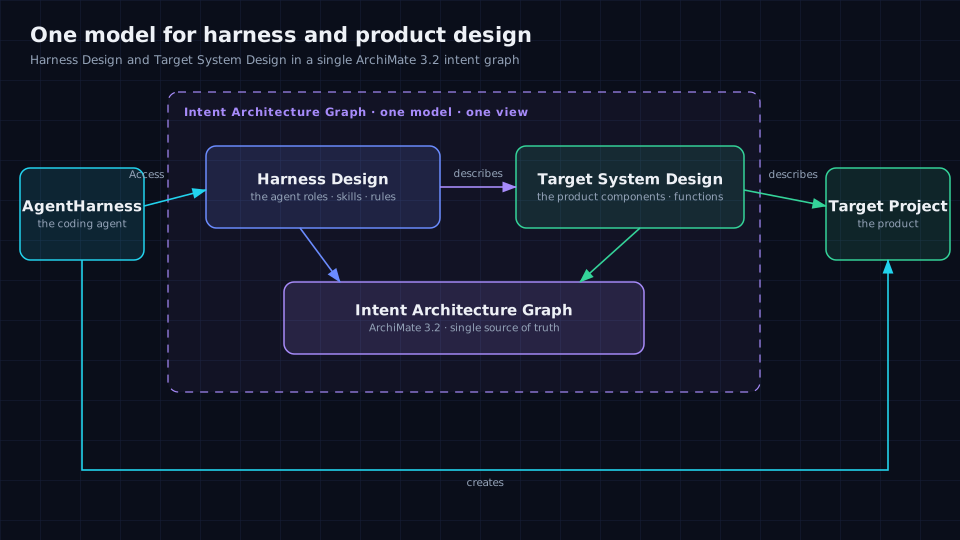
ArchGraph puts harness design and target product design into one model — so you get a single view to work and observe, and real control over your agents. It doubles as the agent's long-term memory: an ArchiMate 3.2 graph exposed through a read/write MCP interface, with deduplicated writes so recall stays precise.
Capabilities
What the framework gives you.
ArchGraph has grown into a long-term memory system for coding agents — a graph you can both reason over and trust, deployed into the harness you already use.
Long-term memory for agents
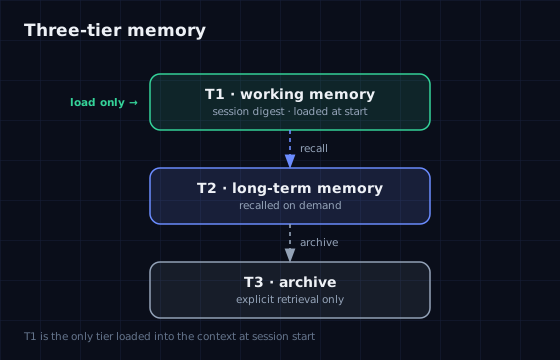
A single ArchiMate 3.2 intent graph, read and written through one MCP interface. Memory is tiered — a compact working memory loaded at session start, a long-term memory recalled on demand, and an archive — so an agent restores context without loading everything.
Clean by construction
Writes are deduplicated: adding an element, relationship, or view reuses an existing match instead of copying it, and a new element semantically near an existing one of the same type is blocked and returned as a candidate. A clean graph is what keeps recall precise.
Semantic + structural retrieval
Find things two ways: semantic (Graph RAG) recall over a vector index, bounded by scope, plus read-only Cypher for structural queries and focused context reads. Recall is loose enough not to miss; audit reads are strict.
Bring your own embedding
Point semantic retrieval at any OpenAI-compatible embedding endpoint. Keep the approved cloud profile, or switch ARGO_EMBEDDING_PROFILE=openai-compatible to a self-hosted model for offline, intranet, or private deployments — no vendor lock-in, with an instruction-aware query path for the models that need one.
Every change is provable
Acceptance tests come first and are executable GIVEN-WHEN-THEN, and the commit that changed an element is registered back onto it — the graph carries its own history and evidence.
Runs in any harness
One argo-deploy registers the MCP server, skills, rules, and agents into GitHub Copilot, Cursor, OpenCode, DeepSeek Harness, and OpenClaw — each with a session wakeup gate.
Enterprise Architect interop
The graph projects into a standard .qea model on write and on argo init, and a human's EA edits become a semantic diff an agent analyzes before anything is written back.
Model your agents too
Represent agents as Business Actors and Roles with their own memory sub-views, assignments, and work packages — harness design and product design in one model.
Federated graph sharing
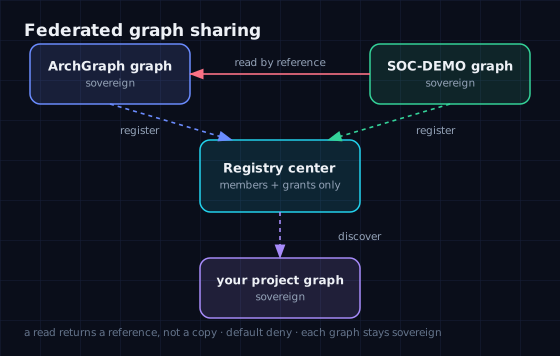
Publish a reusable architecture subgraph to a federated registry, and read another project's opened content by reference — register, discover, authorize, read. Access is denied by default, nothing is copied or merged, and every member keeps its own graph sovereign.
Reads return only what you need
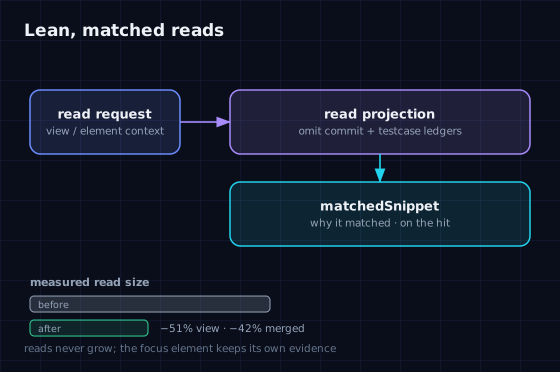
Structural reads omit bookkeeping (commit and testcase ledgers) unless you ask for it, and semantic hits carry a matchedSnippet showing why a result matched — so agents spend context only where it pays.
See what the agent spent
An in-build log records every tool call and its token cost to one file per workspace, and the agent-search-diagnosis skill turns a session into a self-contained diagnosis bundle — over-searching, wasted rounds, and graph↔repo round-trips become visible.
Recall-first retrieval tuning
An opt-in second stage adds hybrid (vector + lexical) fusion and an LLM reranker with fail-open guards. Tuning never shrinks the candidate pool — recall can only go up, never down.
Federated graph sharing — publish a subgraph to the registry, then read another project's opened content by reference. Denied by default; nothing is copied or merged.Three-tier memory — only a compact T1 working memory is loaded at session start; T2 is recalled on demand; T3 is explicit-retrieval-only.Lean, matched reads — bookkeeping ledgers are omitted by default and semantic hits carry a matchedSnippet, so context is spent only where it pays.
01 · Install & deploy
Two commands, and you're ready.
One argo-deploy registers the MCP server and installs the skills, rules, and agents into GitHub Copilot, Cursor, OpenCode, DeepSeek Harness, and OpenClaw — then walks you through a ~/.argo/.env prompt (existing non-empty values are kept).
npm install -g archgraph-argo
argo-deploy
Everything works out of the box except semantic (Graph RAG) queries, which need:
Neo4j graph database
Stores the structural projection of your architecture graph. Point ARGO_NEO4J_DATABASE_URL, ARGO_NEO4J_DATABASE_USERNAME, and ARGO_NEO4J_DATABASE_PASSWORD at any Neo4j instance you can reach (local, Docker, or hosted).
Embedding / vector engine
Powers semantic Graph RAG retrieval. Point ARGO_EMBEDDING_BASE_URL, ARGO_EMBEDDING_MODEL, ARGO_EMBEDDING_PROVIDER, and ARGO_EMBEDDING_DIMENSIONS at any OpenAI-compatible embedding endpoint — a cloud provider (API key in QWEN_KEY), or a self-hosted server for offline / intranet use via ARGO_EMBEDDING_PROFILE=openai-compatible.
The Neo4j credentials come from the Neo4j instance you own or provision; the embedding configuration comes from your embedding provider's dashboard — for example Alibaba DashScope — or from a self-hosted OpenAI-compatible server. Supply them during argo-deploy, or edit ~/.argo/.env afterwards and re-run. Self-hosting guide: docs/self-hosted-embedding-deployment.md.
Design approach
Clean by construction. Every change is traceable.
Deduplicated on write
Adding an element, relationship, or view reuses an existing match (same type + name) instead of creating a copy. A new element that is semantically near an existing element of the same type is blocked and returned as a candidate, so the same concept never forks into two. A genuinely distinct element can still be created explicitly, with a justification.
Because the graph stays clean, semantic recall stays precise — there is no crowd of near-identical records to blur the top results.
Traceable by default
Acceptance tests come first and are executable GIVEN-WHEN-THEN. Every repository change is committed, and the commit id plus related file paths are registered back onto the architecture element it touched — so the graph is its own audit trail.
03 · How to use
Initialize once, then let the agent work.
Step 0 — initialize the workspace. In a fresh project, ask your coding agent to run argo init (the initializeWorkspace MCP call). It creates a starter design/KG/SystemArchitecture.json when missing, performs the first JSON → Neo4j sync, initializes the semantic (Graph RAG) lifecycle, and verifies the architecture.
Then open your project and start a coding agent. It will:
locate the architecture element behind the task before changing anything,
arm itself with that element's Skills and Rules,
work test-first (GIVEN-WHEN-THEN), and trace every commit back to the graph,
reuse an existing element instead of creating a duplicate.
The intent architecture graph — modelled in ArchiMate 3.2 — is the single source of truth.
04 · Graph integrity
Kept clean by construction, not by convention.
Deduplicated on write
Adding an element, relationship, or view reuses an existing match instead of creating a copy. A new element semantically near an existing one of the same type is blocked and returned as a candidate. A genuinely distinct element can still be created explicitly, with a justification.
Single membership
An element or relationship appears at most once per view, matching Enterprise Architect. Duplicate membership is rejected by validation and is never projected twice into the EA model.
Validated structure
Every write is checked against the schema and graph-semantics rules (identities, cross-references, relationship endpoints, view capacity), and the commit that changed an element is registered back onto it.
05 · Community
Built in the open.
ArchGraph runs on open co-building. The community shares and reuses architecture subgraphs across projects — so architecture knowledge is built together, not in silos. Sharing is federated: each project keeps its graph sovereign and other members read opened content by reference.